"The Art of Plant-Based Cooking" Welcome to "The Art of Plant-Based Cooking" blog! If you're reading this, you're probably interested in incorporating more plant-based meals into your diet, and we're here to help you do just that. Plant-based diets have gained popularity in recent years, and for good reason. Not only are they better for the environment and animal welfare, but they can also provide numerous health benefits such as improved digestion and increased energy levels. However, transitioning to a plant-based diet can seem intimidating at first. Where do you start? What do you cook? How do you make sure you're getting all the nutrients you need? Don't worry, we've got you covered with easy-to-follow recipes, meal-planning tips, and advice on finding plant-based options when eating out. Before we dive into the delicious recipes, let's talk about the benefits of a ...
Get link
Facebook
X
Pinterest
Email
Other Apps
Top 10 digital marketing tools for small business
Get link
Facebook
X
Pinterest
Email
Other Apps
-
"Top 10 digital marketing tools for small business"
As a small business owner, it's crucial to have a strong online presence in order to reach and engage with your target audience. Digital marketing has become an essential part of the modern business landscape, and small businesses are no exception. With the right tools, you can effectively drive traffic to your website, generate leads, and convert those leads into customers.
In this blog post, we'll be sharing the top 10 digital marketing tools that every small business should consider incorporating into their marketing strategy. These tools will help you optimize your website for search engines, create visually appealing graphics for social media and other marketing materials, and much more.
Google Analytics:
This free tool is a must-have for any small business. It provides valuable insights into the performance of your website, including how much traffic you're receiving, where it's coming from, and how users are interacting with your site. With this information, you can identify areas for improvement and track the effectiveness of your marketing campaigns.
You may increase marketing ROI and comprehend the customer journey with the free tools provided by Google Analytics.
Google Analytics is implemented with "page tags", in this case, called the Google Analytics Tracking Code, which is a snippet of JavaScript code that the website owner adds to every page of the website. The tracking code runs in the client browser when the client browses the page (if JavaScript is enabled in the browser) and collects visitor data and sends it to a Google data collection server as part of a request for a web beacon.
The tracking code loads a larger JavaScript file from the Google web server and then sets variables with the user's account number. The larger file (currently known as ga.js) was typically 40 kB as of May 2018.
The file does not usually have to be loaded, however, due to browser caching. Assuming caching is enabled in the browser, it downloads ga.js only once at the start of the visit. Furthermore, as all websites that implement Google Analytics with the ga.js code use the same master file from Google, a browser that has previously visited any other website running Google Analytics will already have the file cached on their machine.
In addition to transmitting information to a Google server, the tracking code sets a first party cookie (If cookies are enabled in the browser) on each visitor's computer. This cookie stores anonymous information called the ClientId. Before the launch of Universal Analytics, there were several cookies storing information such as whether the visitor had been to the site before (new or returning visitor), the timestamp of the current visit, and the referrer site or campaign that directed the visitor to the page (e.g., search engine, keywords, banner, or email).
If the visitor arrived at the site by clicking on a link tagged with UTM parameters (Urchin Tracking Module) such as: https://www.example.com/page?utm_content=buffercf3b2&utm_medium=social&utm_source=facebook.com&utm_campaign=buffer
then the tag values are passed to the database too.
Social media is an important part of any small business's marketing strategy, and Hootsuite makes it easy to manage all of your accounts in one place. With this platform, you can schedule and publish content, as well as track and analyze your social media performance.
The greatest option for organizations looking for an all-in-one social media management solution that integrates with a variety of social networks is Hootsuite. The entry-level subscriptions have reasonable prices and give users access to a fantastic platform for creating and keeping track of social media content.
Key Features
Post Scheduling:
Though its feature set has grown over the years, Hootsuite’s bread-and-butter feature is still scheduling social media posts.
When you schedule a post on Hootsuite, the first thing you’ll do is choose which social networks to post to.
And you can select any that you’ve integrated with Hootsuite.
Next, you’ll write the post itself.
And add media, like images (you can either upload your own or use one from Hootsuite’s media library).
And you’ll get a preview of how your post will look.
Obviously, the exact post will look a bit different depending on where you’re posting. But this preview gives you a general idea.
Next, you can select the exact date and time to publish with the “Schedule for Later” feature.
That way, you can schedule posts well in advance.
You can even use Hootsuite.com’s automatic scheduling feature to let it decide an optimum time for you based on its algorithms. Pretty cool.
Once you have some posts scheduled, they’ll show up in your Planner – Hootsuite’s calendar of upcoming posts. This helps keep things organized and lets you see what’s coming up at a glance.
You can also draft posts directly on the calendar, and drag and drop them to fill different time slots.
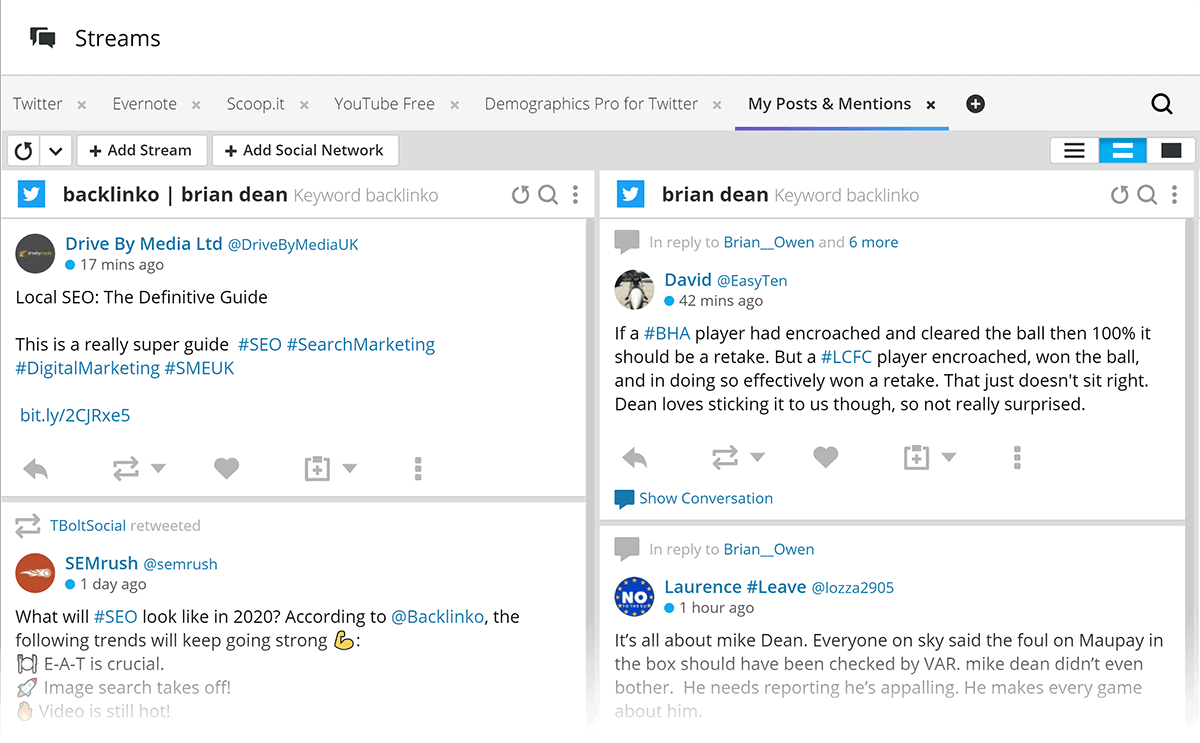
Streams
The “Streams” feature lets you easily monitor the different social media channels you’re active on. In your Streams, Hootsuite will show you a constant feed of relevant social media activity.
The most basic way you can use Streams is to keep an eye on your own mentions in real time.
But you can also set them up to show you posts using certain keywords, hashtags, or posts from specific social media accounts (like influencers or VIP contacts).
And of course, you can do this for any of Hootsuite’s supported social media networks.
Then you can respond quickly (right from within Hootsuite), regardless of where the conversation is happening.
Mailchimp:
Email marketing is still a highly effective way to reach and engage with your audience, and Mailchimp is a user-friendly platform that makes it easy to create and send newsletters, automated emails, and targeted campaigns.
Set up automation that sends emails based on customer behavior to increase traffic and sales.
Canva:
Graphic design can be a daunting task, especially for those who don't have a lot of experience. That's where Canva comes in. This tool allows you to create visually appealing graphics for social media, blog posts, and other marketing materials, even if you have no design experience.
SEO (search engine optimization) is crucial for small businesses looking to improve their online visibility. Ahrefs is a powerful SEO tool that helps you track your website's performance in search engines, identify keywords, and analyze your competitors' SEO strategies.
SEMrush:
This comprehensive digital marketing tool offers a range of features for SEO, including website audits, keyword research, and rank tracking. It also includes a range of tools for PPC (pay-per-click) advertising, social media management, and content marketing.
Buffer:
Social media scheduling is an important part of any small business's marketing strategy, and Buffer makes it easy to schedule and publish content on multiple platforms at once.
One of the key benefits of using Buffer is the ability to schedule social media posts in advance. This allows you to plan and organize your content in a way that aligns with your marketing strategy and ensures a consistent presence on social media. It's particularly useful for businesses that want to maintain a presence on social media but don't have the time or resources to constantly be posting updates.
Buffer also makes it easy to collaborate with team members and share content within an organization. With the platform's collaboration features, multiple team members can contribute to the social media posting schedule and review and approve content before it's published.
In addition to scheduling and publishing, Buffer also offers a range of tools for social media listening and customer service. With the platform's listening features, you can monitor social media conversations and gather insights about your audience and industry. The customer service features allow you to manage and respond to customer inquiries and complaints in a timely and efficient manner.
Overall, Buffer is a powerful and easy-to-use social media management platform that can help small businesses and organizations streamline their social media marketing efforts and save time.
HubSpot:
This all-in-one marketing platform offers a range of tools for email marketing, social media management, lead generation, and more. It's a great option for small businesses looking for a comprehensive marketing solution.
Adobe
Creative Cloud: For small businesses that need professional-quality graphics for marketing materials, Adobe Creative Cloud is a must-have. This suite of design tools includes popular software such as Photoshop and Illustrator.
Moz:
Moz is a leading SEO and inbound marketing platform that offers a range of tools for keyword research, website audits, and link building. It's a great option for small businesses looking to improve their search engine rankings.
By incorporating these top 10 digital marketing tools into your marketing strategy, you can effectively reach and engage with your target audience, drive traffic to your website, and convert leads into customers. Whether you're a small business owner-,k-tools-anabia




Comments
Post a Comment